

In this article, we’re going to walk through how to automatically generate course completion certificates using an event-driven serverless pipeline on AWS, built with EventBridge, SQS, Lambda, S3, and PDFKit.
This is a common requirement for online learning platforms, professional development systems, or any application where you need to reward users with verifiable credentials, and let’s be honest, a certificate that arrives seconds after completing a course feels magical.
“The goal is simple: the moment a student completes their final module, a personalised PDF certificate and shareable thumbnail are generated, stored, and ready to download, without any manual intervention or blocking the user experience.”
The Problem We’re Solving 🎯
When a student finishes a course on your platform, you want to celebrate that achievement. A certificate of completion serves multiple purposes:
- Proof of learning for employers and LinkedIn profiles.
- Motivation for students to finish courses.
- Credibility for your platform’s brand.
- Shareability — students become ambassadors when they share certificates on social media.
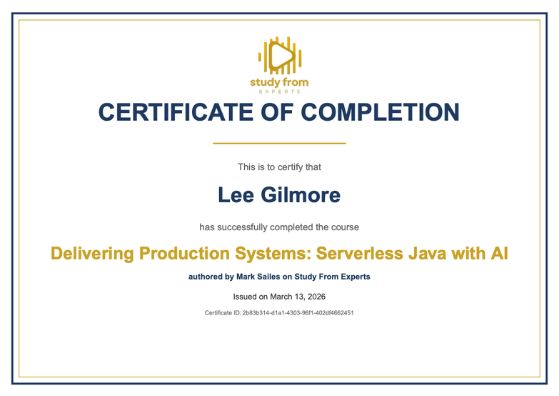
But generating certificates isn’t trivial. You need to:
- Detect course completion reliably across all modules.
- Hydrate data — fetch the student’s name, course title, and instructor details.
- Generate a professional PDF with branding, layout, and proper typography.
- Create a shareable thumbnail (JPG) for social media previews.
- Store everything in S3 behind your CDN for fast delivery.
- Record the certificate in your database for future retrieval and validation.
- Notify the student that their certificate is ready through email.
- Do all of this asynchronously without blocking the completion flow, and ensuring it is massively scalable.
Let’s dive into how we achieve this with an event-driven pipeline.
Our Example
We’re building this for an online learning platform where instructors publish courses made up of video modules. When a student watches all modules, and their progress reaches 100%, the system marks the course as completed. At that point, we want a certificate to appear in their profile automatically.
💡 Note: All code examples are for discussion only and can be further productionised.
Architecture Overview 🏗️
The certificate generation pipeline is triggered by domain events and flows through several AWS services:
┌───────────────────┐     ┌───────────────────┐     ┌──────────────────────┐
│  DynamoDB Stream  │────▶│  Stream Processor │────▶│     EventBridge      │
│  (course marked   │     │  (detects course  │     │  (CourseCompleted    │
│   complete)       │     │   completion)     │     │   event published)   │
└───────────────────┘     └───────────────────┘     └─────────┬────────────┘
                                                              │
                                                              ▼
                                                   ┌──────────────────────┐
                                                   │  EventBridge Rule    │
                                                   │  (routes to SQS)     │
                                                   └──────────┬───────────┘
                                                              │
                                                              ▼
                                                   ┌───────────────────────┐
                                                   │      SQS Queue        │
                                                   │  (certificate-queue)  │
                                                   │  + Dead Letter Queue  │
                                                   └──────────┬────────────┘
                                                              │
                                                              ▼
                                                   ┌───────────────────────┐
                                                   │  Lambda: Certificate  │
                                                   │  Processor            │
                                                   │  - Validates event    │
                                                   │  - Hydrates user/     │
                                                   │    course data        │
                                                   │  - Generates PDF      │
                                                   │  - Generates JPG      │
                                                   │  - Uploads to S3      │
                                                   │  - Creates DB record  │
                                                   │  - Publishes event    │
                                                   └──────────┬────────────┘
                                                              │
                                              ┌───────────────┼───────────────┐
                                              ▼               ▼               ▼
                                   ┌────────────────┐ ┌─────────────┐ ┌─────────────┐
                                   │  S3 (CDN)      │ │  DynamoDB   │ │ EventBridge │
                                   │  - PDF         │ │  (cert      │ │ (Certificate│
                                   │  - Thumbnail   │ │   record)   │ │  Generated  │
                                   │  - Metadata    │ │             │ │    event    │
                                   └────────────────┘ └─────────────┘ └─────────────┘
                                                                              │
                                                                              ▼
                                                                   ┌──────────────────┐
                                                                   │  Email Service   │
                                                                   │  (notifies       │
                                                                   │   student)       │
                                                                   └──────────────────┘
The flow works like this:
- Course Completion: When a student completes their final module, the enrollment record in DynamoDB is updated with a
completionDate. - Stream Detection: The DynamoDB Stream processor detects the change (comparing old and new images) and publishes a
CourseCompleteddomain event to the central EventBridge bus. - Event Routing: An EventBridge rule matches
CourseCompletedevents and routes them to a dedicated SQS queue. - Queue Buffering: SQS provides reliable delivery with retry semantics and a dead letter queue for failures.
- Certificate Generation: A Lambda function processes the message, hydrates data, generates the PDF and thumbnail, uploads to S3, and creates the database record.
- Downstream Events: A
CertificateGeneratedevent is published, triggering an email notification to the student.
This is event-driven architecture in action; the completion flow doesn’t know about certificates, the certificate service doesn’t know about emails, and each component can fail independently without breaking the others.
Why Event-Driven? 🔄
You might be wondering: why not just generate the certificate synchronously when the student completes the course? A few reasons:
Decoupling: The course completion logic shouldn’t know about certificates. Today it’s a PDF, tomorrow it might be a text message, a LinkedIn badge, or a Slack notification. By publishing a domain event, we can add new consumers without touching the completion code.
Reliability: PDF generation involves external libraries, font loading, image processing, and S3 uploads. Any of these can fail. With SQS and a dead letter queue, failed attempts are retried automatically (up to 3 times) before landing in the DLQ for investigation.
Performance: Generating a PDF with embedded fonts and images takes 1-3 seconds. That’s fine asynchronously, but you wouldn’t want to add that latency to the API response when a student marks their final module complete.
Scalability: If 1,000 students complete courses simultaneously (end of a cohort, for example), the SQS queue absorbs the burst, and the Lambda processes them at a controlled rate via batch processing.
💡This is event-driven architecture in action! Each component does one thing, communicates via events, and the pipeline flows naturally from upload to playable captioned video.
We call this choreography rather than orchestration, and it is covered in this great course by James Eastham here: https://www.studyfromexperts.com/courses/serverless-integration-patterns/
Detecting Course Completion with DynamoDB Streams
The first piece of the puzzle is detecting when a course is actually completed. We use DynamoDB Streams with NEW_AND_OLD_IMAGES to compare the before and after states of every record change.
// stream-changes-processor.use-case.ts (simplified)
case EntityTypes.UserCourse: {
  const userCourseItem = item as UserCourseDbModel;
  const oldUserCourseItem = oldItem as UserCourseDbModel | undefined;

  // Upsert to DSQL for reporting...

  // Detect when completionDate was set (null → value)
  const wasJustCompleted =
    userCourseItem.completionDate &&
    (!oldUserCourseItem || !oldUserCourseItem.completionDate);

  if (wasJustCompleted) {
    try {
      await publishEventWithAutoDomain(EventType.CourseCompleted, {
        userId: userCourseItem.userId,
        courseId: userCourseItem.courseId,
        enrollmentId: userCourseItem.userCourseId,
        completedAt: userCourseItem.completionDate,
      });
    } catch (error) {
      // Log but don't throw — event publishing must not fail stream processing
      logger.error('Failed to publish CourseCompleted event', { error });
    }
  }
  break;
}
A few things to call out here:
✔️ Old image comparison: We compare oldItem.completionDate with item.completionDate to detect the exact moment of completion. This prevents duplicate events if the record is updated again later.
✔️ Non-blocking event publishing: The try-catch ensures that a failure to publish the event doesn’t break the stream processor. The stream processor’s primary job is DSQL synchronisation, and event publishing is a secondary concern.
✔️ Rich event payload: We include userId, courseId, enrollmentId, and completedAt in the event, so downstream consumers have everything they need without additional lookups.
CDK Infrastructure: The Certificate Service Stack
The certificate service is deployed as a CDK nested stack containing the SQS queue, EventBridge rule, and Lambda function.
Let’s walk through the key infrastructure components.
The EventBridge Rule
This is the glue between the domain event and the certificate pipeline:
// certificate-service-nested.ts
import * as events from 'aws-cdk-lib/aws-events';
import * as targets from 'aws-cdk-lib/aws-events-targets';

// EventBridge rule to route CourseCompleted events to certificate queue
const certificateEventsRule = new events.Rule(
  this,
  'CertificateEventsRule',
  {
    eventBus: props.eventBus,
    ruleName: `${stageName}-certificate-events-to-queue`,
    description: 'Routes CourseCompleted events to the certificate queue',
    eventPattern: {
      source: ['sfe-service'],
      detailType: ['CourseCompleted'],
    },
    targets: [new targets.SqsQueue(certificateQueue)],
  },
);
Simple and declarative. The rule says: “When an event with source sfe-service and detail type CourseCompleted arrives on the event bus, send it to the certificate SQS queue.”
The SQS Queue with Dead Letter Queue
Reliability is built in from the start:
import * as sqs from 'aws-cdk-lib/aws-sqs';

// Dead Letter Queue for failed certificate processing
const certificateQueueDlq = new sqs.Queue(this, 'CertificateQueueDLQ', {
  queueName: `${stageName}-certificate-queue-dlq`,
  fifo: false,
  retentionPeriod: cdk.Duration.days(14),
  enforceSSL: true,
});

// Main Certificate Queue
const certificateQueue = new sqs.Queue(this, 'CertificateQueue', {
  queueName: `${stageName}-certificate-queue`,
  fifo: false,
  visibilityTimeout: cdk.Duration.seconds(180), // 6x Lambda timeout
  retentionPeriod: cdk.Duration.days(14),
  enforceSSL: true,
  deadLetterQueue: {
    queue: certificateQueueDlq,
    maxReceiveCount: 3, // Retry 3 times before DLQ
  },
});
Key design decisions:
- Visibility timeout = 6x Lambda timeout: AWS recommends this ratio. Our Lambda has a 30-second timeout, so visibility is 180 seconds. This prevents messages from being reprocessed while the Lambda is still working on them. (Note: It is typically 1-5 seconds max for certificate generation, so 30 is very generous).
- Max receive count = 3: If certificate generation fails 3 times (maybe a transient S3 issue), the message moves to the DLQ rather than retrying forever.
- 14-day retention: Gives us plenty of time to investigate DLQ messages and replay them (we also get a notification of any failures).
The Certificate Processor Lambda
The Lambda is configured with extra memory (1024MB) because PDF generation and image processing are CPU-intensive:
import { ProgressiveLambda } from '../../../app-constructs';

const certificateProcessor = new ProgressiveLambda(
  this,
  'CertificateProcessorLambda',
  {
    layers: [sharpLayer], // Sharp for image processing
    functionName: `${stageName}-certificate-processor`,
    runtime: props.stateless.runtimes,
    entry: path.join(
      __dirname,
      '../../../src/adapters/primary/certificate/process-certificate/process-certificate.adapter.ts',
    ),
    handler: 'handler',
    memorySize: 1024,
    architecture: lambda.Architecture.ARM_64,
    tracing: lambda.Tracing.ACTIVE,
    timeout: cdk.Duration.seconds(30),
    description: 'Processes CourseCompleted events and generates PDF certificates',
    environment: lambdaConfig,
    bundling: {
      minify: true,
      externalModules: ['@aws-sdk/*', 'sharp'],
      nodeModules: ['pdfkit'],
      commandHooks: {
        beforeBundling: () => [],
        beforeInstall: () => [],
        afterBundling: (inputDir: string, outputDir: string) => [
          // Bundle font and image assets into the Lambda package
          `mkdir -p ${outputDir}/assets/certification/images`,
          `mkdir -p ${outputDir}/assets/certification/fonts`,
          `cp ${inputDir}/src/assets/certification/images/cert-logo.png ${outputDir}/assets/certification/images/`,
          `cp ${inputDir}/src/assets/certification/fonts/*.ttf ${outputDir}/assets/certification/fonts/`,
          `cp ${inputDir}/src/assets/certification/fonts/fonts.conf ${outputDir}/assets/certification/fonts/`,
        ],
      },
    },
    // ... CodeDeploy and monitoring config
  },
);

// Configure Lambda to process messages from Certificate Queue
certificateProcessor.lambda.addEventSource(
  new lambdaEventSources.SqsEventSource(certificateQueue, {
    batchSize: 10,
    maxBatchingWindow: cdk.Duration.seconds(1),
    reportBatchItemFailures: true,
  }),
);

// Least-privilege permissions
...
A few things worth highlighting:
✔️ Sharp Lambda Layer: We use a pre-compiled Sharp layer for ARM64 to handle SVG-to-JPG conversion for thumbnails. Sharp needs native binaries, so a Lambda Layer is the cleanest approach.
✔️ Asset bundling: The commandHooks.afterBundling Step copies fonts and images into the Lambda deployment package. This ensures PDFKit and Sharp can access brand assets at runtime.
✔️ Batch processing with partial failures: reportBatchItemFailures: true means if one certificate in a batch of 10 fails, only that message is retried, and the other 9 are acknowledged successfully.
The Certificate Processor Use Case
Now let’s look at the business logic. The use case orchestrates the entire certificate generation flow in a single Lambda invocation (this is the use case below, as we follow hexagonal architecture in approach).
// process-certificate.use-case.ts
import { PutObjectCommand, S3Client } from '@aws-sdk/client-s3';
import { config } from '@config';
import type { CertificateModel } from '@domain/certificate';
import { EventType } from '@events/common';
import { courseCompletedDataSchema } from '@events/course';
import { createCertificate } from '@repositories/database-repository/certificate.repository';
import { getCourseById } from '@repositories/database-repository/course.repository';
import { getUserById } from '@repositories/database-repository/user.repository';
import { publishEventWithAutoDomain } from '@repositories/events-repository';
import { logger } from '@shared/logger';
import { v4 as uuid } from 'uuid';
import { generateCertificatePdf } from './generate-certificate-pdf';
import { generateCertificateThumbnail } from './generate-certificate-thumbnail';

const s3Client = new S3Client({});

export async function processCertificateUseCase(
  eventData: CourseCompletedData,
): Promise<ProcessCertificateResult> {
  logger.info('Processing certificate generation', {
    userId: eventData.userId,
    courseId: eventData.courseId,
  });

  // Step 1: Validate event payload with Zod
  const validationResult = courseCompletedDataSchema.safeParse(eventData);

  if (!validationResult.success) {
    const errorMessages = validationResult.error.issues
      .map((issue) => `${issue.path.join('.')}:${issue.message}`)
      .join(', ');
    throw new Error(`Invalid event payload:${errorMessages}`);
  }

  const { userId, courseId, completedAt } = validationResult.data;

  // Step 2: Hydrate user and course data from DynamoDB
  const [user, course] = await Promise.all([
    getUserById(userId),
    getCourseById(courseId),
  ]);

  const userName = `${user.givenName}${user.familyName}`;
  const courseName = course.title;
  const instructorName = course.instructorName;

  // Step 3: Generate certificate ID and timestamps
  const certificateId = uuid();
  const issuedAt = completedAt;

  // Step 4: Generate PDF certificate
  const pdfBuffer = await generateCertificatePdf({
    certificateId,
    userName,
    courseName,
    instructorName,
    issuedAt,
  });

  // Step 5: Generate shareable thumbnail (JPG)
  const thumbnailBuffer = await generateCertificateThumbnail({
    certificateId,
    userName,
    courseName,
    instructorName,
    issuedAt,
  });

  // Step 6: Upload files to S3 in parallel
  const bucketName = config.get('bucketName');
  ... // creating file paths

  await Promise.all([
    uploadToS3(bucketName, pdfKey, pdfBuffer, 'application/pdf'),
    uploadToS3(bucketName, thumbnailKey, thumbnailBuffer, 'image/jpeg'),
    uploadToS3(bucketName, metadataKey, JSON.stringify({
      certificateId, userId, courseId, courseName, userName, issuedAt,
    }), 'application/json'),
  ]);

  // Step 7: Create Certificate entity in DynamoDB
  const certificate: CertificateModel = {
    certificateId,
    userId,
    courseId,
    courseName,
    userName,
    issuedAt,
    pdfUrl: `/${pdfKey}`,
    thumbnailUrl: `/${thumbnailKey}`,
    status: 'ACTIVE',
    created: new Date().toISOString(),
  };

  await createCertificate(certificate);

  // Step 8: Publish CertificateGenerated event (non-blocking)
  const publishResult = await publishEventWithAutoDomain(
    EventType.CertificateGenerated,
    {
      certificateId,
      userId,
      courseId,
      courseName,
      userName,
      issuedAt,
      certificateUrl: `/${pdfKey}`,
    },
  );

  if (!publishResult.success) {
    // Log error but don't fail — certificate was already created and the user will see on screen
    logger.error('Failed to publish CertificateGenerated event', {
      certificateId,
      errorMessage: publishResult.errorMessage,
    });
  }

  return { certificateId, pdfUrl: `/${pdfKey}`, thumbnailUrl: `/${thumbnailKey}`, issuedAt };
}
Non-Blocking Event Publishing
The CertificateGenerated event triggers downstream actions (like sending an email to the student), but if EventBridge is temporarily unavailable or there is a permissions issue (both very unlikely, of course), we don’t want to fail the entire certificate generation. The PDF is already in S3, the record is in DynamoDB, and the student can access their certificate. The email notification is a nice-to-have, not a requirement.
Generating the PDF Certificate
For PDF generation, we use PDFKit — a mature Node.js library that produces high-quality PDFs without requiring headless browsers or external services.
// generate-certificate-pdf.ts
import PDFDocument from 'pdfkit';

export interface CertificateData {
  certificateId: string;
  userName: string;
  courseName: string;
  instructorName: string;
  issuedAt: string;
}

const BRAND_COLORS = {
  primary: '#1E3A5F',    // Deep navy blue
  secondary: '#C9A227',  // Gold accent
  text: '#333333',       // Dark gray for text
  lightText: '#666666',  // Light gray for secondary text
};

export async function generateCertificatePdf(
  data: CertificateData,
): Promise<Buffer> {
  return new Promise((resolve, reject) => {
    const doc = new PDFDocument({
      size: 'A4',
      layout: 'landscape',
      margins: { top: 50, bottom: 50, left: 50, right: 50 },
    });

    const chunks: Buffer[] = [];
    doc.on('data', (chunk: Buffer) => chunks.push(chunk));
    doc.on('end', () => resolve(Buffer.concat(chunks)));
    doc.on('error', reject);

    const pageWidth = 841.89;
    const pageHeight = 595.28;
    const contentWidth = pageWidth - 100;

    // Decorative double border
    doc.rect(20, 20, pageWidth - 40, pageHeight - 40)
      .lineWidth(3).stroke(BRAND_COLORS.primary);
    doc.rect(30, 30, pageWidth - 60, pageHeight - 60)
      .lineWidth(1).stroke(BRAND_COLORS.secondary);

    let y = 50;

    // Logo (loaded from bundled assets)
    y = drawLogo(doc, pageWidth, y);

    // Title
    doc.font('Helvetica-Bold').fontSize(36)
      .fillColor(BRAND_COLORS.primary)
      .text('CERTIFICATE OF COMPLETION', 50, y, {
        width: contentWidth, align: 'center',
      });
    y += 60;

    // Gold decorative line
    const lineStart = (pageWidth - 200) / 2;
    doc.moveTo(lineStart, y).lineTo(lineStart + 200, y)
      .lineWidth(2).stroke(BRAND_COLORS.secondary);
    y += 30;

    // "This is to certify that"
    doc.font('Helvetica').fontSize(14)
      .fillColor(BRAND_COLORS.lightText)
      .text('This is to certify that', 50, y, {
        width: contentWidth, align: 'center',
      });
    y += 35;

    // Student name (prominent)
    doc.font('Helvetica-Bold').fontSize(32)
      .fillColor(BRAND_COLORS.primary)
      .text(data.userName, 50, y, {
        width: contentWidth, align: 'center',
      });
    y += 55;

    // "has successfully completed the course"
    doc.font('Helvetica').fontSize(14)
      .fillColor(BRAND_COLORS.lightText)
      .text('has successfully completed the course', 50, y, {
        width: contentWidth, align: 'center',
      });
    y += 35;

    // Course name (gold accent)
    doc.font('Helvetica-Bold').fontSize(26)
      .fillColor(BRAND_COLORS.secondary)
      .text(data.courseName, 50, y, {
        width: contentWidth, align: 'center',
      });
    y += 40;

    // Instructor attribution
    doc.font('Helvetica-Bold').fontSize(12)
      .fillColor(BRAND_COLORS.primary)
      .text(`authored by${data.instructorName}`, 50, y, {
        width: contentWidth, align: 'center',
      });
    y += 30;

    // Issue date
    const formattedDate = new Date(data.issuedAt).toLocaleDateString('en-US', {
      year: 'numeric', month: 'long', day: 'numeric',
    });
    doc.font('Helvetica').fontSize(12)
      .fillColor(BRAND_COLORS.text)
      .text(`Issued on${formattedDate}`, 50, y, {
        width: contentWidth, align: 'center',
      });
    y += 25;

    // Certificate ID (small, for verification)
    doc.font('Helvetica').fontSize(9)
      .fillColor(BRAND_COLORS.lightText)
      .text(`Certificate ID:${data.certificateId}`, 50, y, {
        width: contentWidth, align: 'center',
      });

    doc.end();
  });
}
Font Handling in Lambda
One gotcha with PDFKit in Lambda: you need to bundle your fonts as we discussed earlier. Lambda doesn’t have custom fonts installed, so we include Roboto TTF files in the deployment package and reference them at runtime:
// In CDK bundling config
afterBundling: (inputDir: string, outputDir: string) => [
  `mkdir -p ${outputDir}/assets/certification/fonts`,
  `cp ${inputDir}/src/assets/certification/fonts/*.ttf ${outputDir}/assets/certification/fonts/`,
  `cp ${inputDir}/src/assets/certification/fonts/fonts.conf ${outputDir}/assets/certification/fonts/`,
],
The fonts.conf file tells fontconfig (used by Sharp for thumbnail generation) where to find the fonts. Without it, SVG text rendering falls back to system fonts that may not exist in Lambda.
Generating the Shareable Thumbnail
Students want to share their achievements on LinkedIn and other social media platforms. A PDF isn’t great for that, so you need a JPG image. We generate a thumbnail that mirrors the PDF layout using SVG rendered through Sharp.
// generate-certificate-thumbnail.ts
import sharp from 'sharp';

export async function generateCertificateThumbnail(
  data: ThumbnailData,
): Promise<Buffer> {
  // Render at 2x scale for crisp output
  const scale = 2;
  const width = 842 * scale;
  const height = 595 * scale;

  // Escape user input for safe SVG rendering
  const userName = escapeXml(truncateText(data.userName, 50));
  const courseName = escapeXml(truncateText(data.courseName, 60));
  const instructorName = escapeXml(truncateText(data.instructorName, 50));

  // Load fonts as base64 for embedding in SVG
  const fontRegularBuffer = loadAsset('fonts/Roboto-Regular.ttf');
  const fontBoldBuffer = loadAsset('fonts/Roboto-Bold.ttf');
  const logoBuffer = loadAsset('images/cert-logo.png');

  const svg = `
    <svg width="${width}" height="${height}" xmlns="<http://www.w3.org/2000/svg>">
      <defs>
        <style>
          @font-face {
            font-family: 'Roboto';
            font-weight: 400;
            src: url('data:font/truetype;base64,${fontRegularBuffer?.toString('base64')}');
          }
          @font-face {
            font-family: 'Roboto';
            font-weight: 700;
            src: url('data:font/truetype;base64,${fontBoldBuffer?.toString('base64')}');
          }
        </style>
      </defs>

      <!-- Background and borders matching PDF -->
      <rect width="100%" height="100%" fill="#FAFAFA"/>
      <rect x="${20 * scale}" y="${20 * scale}"
            width="${width - 40 * scale}" height="${height - 40 * scale}"
            fill="none" stroke="#1E3A5F" stroke-width="${3 * scale}"/>

      <!-- Certificate content (matching PDF layout) -->
      <text x="${width / 2}" y="${155 * scale}" text-anchor="middle"
            font-family="Roboto" font-weight="700" font-size="${36 * scale}"
            fill="#1E3A5F">
        CERTIFICATE OF COMPLETION
      </text>

      <text x="${width / 2}" y="${260 * scale}" text-anchor="middle"
            font-family="Roboto" font-weight="700" font-size="${32 * scale}"
            fill="#1E3A5F">
${userName}
      </text>

      <text x="${width / 2}" y="${345 * scale}" text-anchor="middle"
            font-family="Roboto" font-weight="700" font-size="${26 * scale}"
            fill="#C9A227">
${courseName}
      </text>

      <!-- ... additional text elements ... -->
    </svg>
  `;

  // Convert SVG to high-quality JPG
  return sharp(Buffer.from(svg))
    .jpeg({ quality: 95, mozjpeg: true })
    .toBuffer();
}
The Event Chain: Certificate → Email Notification 📧
Once the certificate is generated, we publish a CertificateGenerated event. This triggers a separate email service that sends the student a notification with a link to download their certificate.
// In the certificate processor (after S3 upload and DB record creation)
await publishEventWithAutoDomain(EventType.CertificateGenerated, {
  certificateId,
  userId,
  courseId,
  courseName,
  userName,
  issuedAt,
  certificateUrl: pdfUrl,
});
The email service picks this up via its own EventBridge rule and sends a branded email:
┌──────────────────┐     ┌──────────────────┐     ┌──────────────────┐
│  EventBridge     │────▶│  Email Queue     │────▶│  Email Processor │
│  (Certificate    │     │  Processor       │     │  (renders HTML,  │
│   Generated)     │     │  (schedules via  │     │   sends via SES) │
│                  │     │   EB Scheduler)  │     │                  │
└──────────────────┘     └──────────────────┘     └──────────────────┘
This is the beauty of event-driven architecture; the certificate service doesn’t know about emails. It just publishes what happened. The email service independently subscribes to events it cares about and handles notification delivery with its own retry logic, idempotency checks, and bounce handling.
If we later want to add a Slack notification, a webhook to an LMS, or a LinkedIn badge integration, we just add another EventBridge rule. Zero changes to the certificate service.
Cost Considerations
Certificate generation is remarkably cheap on serverless:
Component | Cost per Certificate | 1,000 Certificates |
|---|---|---|
Lambda (1024MB, ~3s) | ~$0.00005 | $0.05 |
S3 PutObject (3 files) | ~$0.000015 | $0.015 |
SQS message | ~$0.0000004 | $0.0004 |
EventBridge event (2x) | ~$0.000002 | $0.002 |
DynamoDB write | ~$0.00000125 | $0.00125 |
Total | ~$0.00007 | ~$0.07 |
That’s roughly $0.07 per 1,000 certificates. Even at 100,000 certificates per month, you’re looking at about $7. The Sharp Lambda Layer and PDFKit are open source, i.e. no per-use licensing fees.
Wrapping Up 📝
We’ve covered a lot of ground in this article:
The key takeaways:
- Domain events are the trigger — detect state changes in your data layer and publish meaningful business events, not CRUD notifications.
- SQS provides the safety net — visibility timeouts, retry counts, and dead letter queues mean you can sleep at night knowing certificates will eventually be generated.
- PDFKit is Lambda-friendly — no Chromium binaries, no headless browsers, just pure Node.js PDF generation.
- Event chains enable extensibility — the certificate service publishes what happened, and any number of downstream services can react independently.
- Bundle your assets — fonts, images, and config files need to be explicitly included in your Lambda deployment package via CDK bundling hooks.
I hope you found this article useful. If you have any questions or feedback, feel free to reach out!
Ready to level up your AWS skills?
Visit sign-up today and join a community of builders and architects dedicated to mastering the cloud.